


Fallout: New Vegas - Easy ITEM DUPLICATION Glitch (STILL WORKS)


I’m gonna show you how to duplicate items in Fallout New Vegas, it’s pretty simple once you get the hang of it, there are some important steps here so pay attention! As always you can scroll to the bottom of this page and watch the video instead!
STEP 1
Ok, step 1, you’ll need a stack of an item in your inventory, the stack has to be 6 or higher, and it needs to be weighted. If it has no weight to it the “how many” menu won’t pop up and we won’t be able to glitch the game. If you’re on hardcore mode ammo has weight to it, if not, then you’ll need to scavenge for items. I grabbed dynamite from a house at the beginning of the game, I have 7 so we’ll use those.
STEP 2
Step 2, you’ll need to find a container, now the downside to this glitch is you’ll only be able to duplicate things you find naturally in a container, so bottlecaps, stimpacks, there’s loads you can dupe, but it has to have spawned there naturally. I duplicated conductors just to show the technique.

STEP 3
So once you’ve found the item you want in the container, move the stack of items from your inventory to the container.

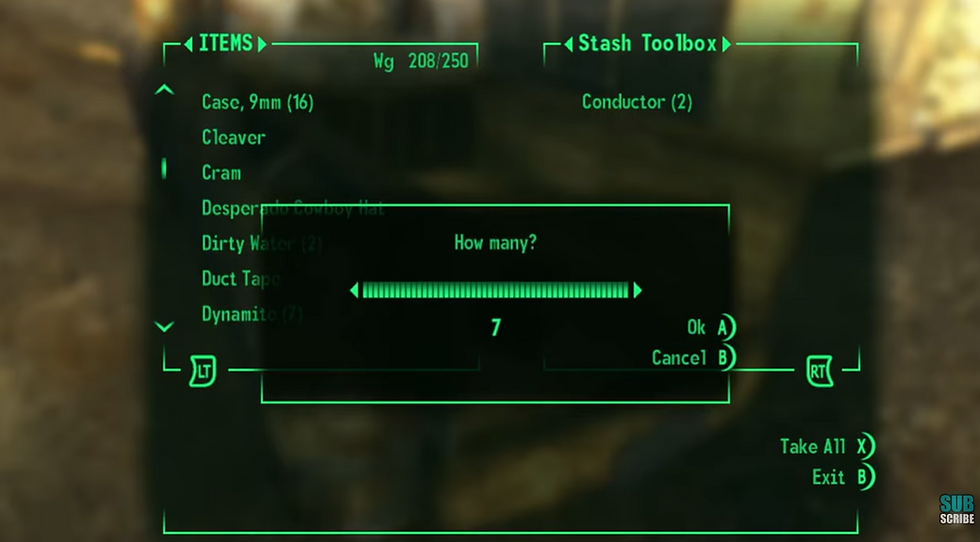
Now tab over to the container, and you’ll want to select your stack and before the “how many” box pops up, you’ll want to hit select again. It will move the stack over and the “how many” box will stay on screen.

Press select again to get rid of the “how many” box, this will also move the item you wanted to duplicate into your inventory, and you’ll now have a stack of that item!
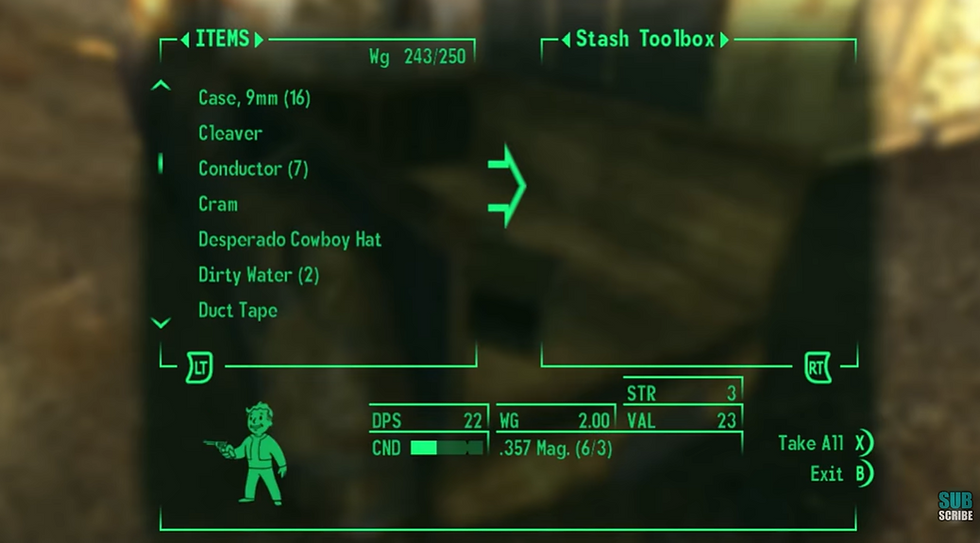

I’m on PC and the way I’ve nailed this glitch every time is I select my stacked item using a controller and then hit A on my keyboard at basically the exact same time, then to close the “how many” box and dupe the item I hit A on my keyboard again. It’s fool proof!

